
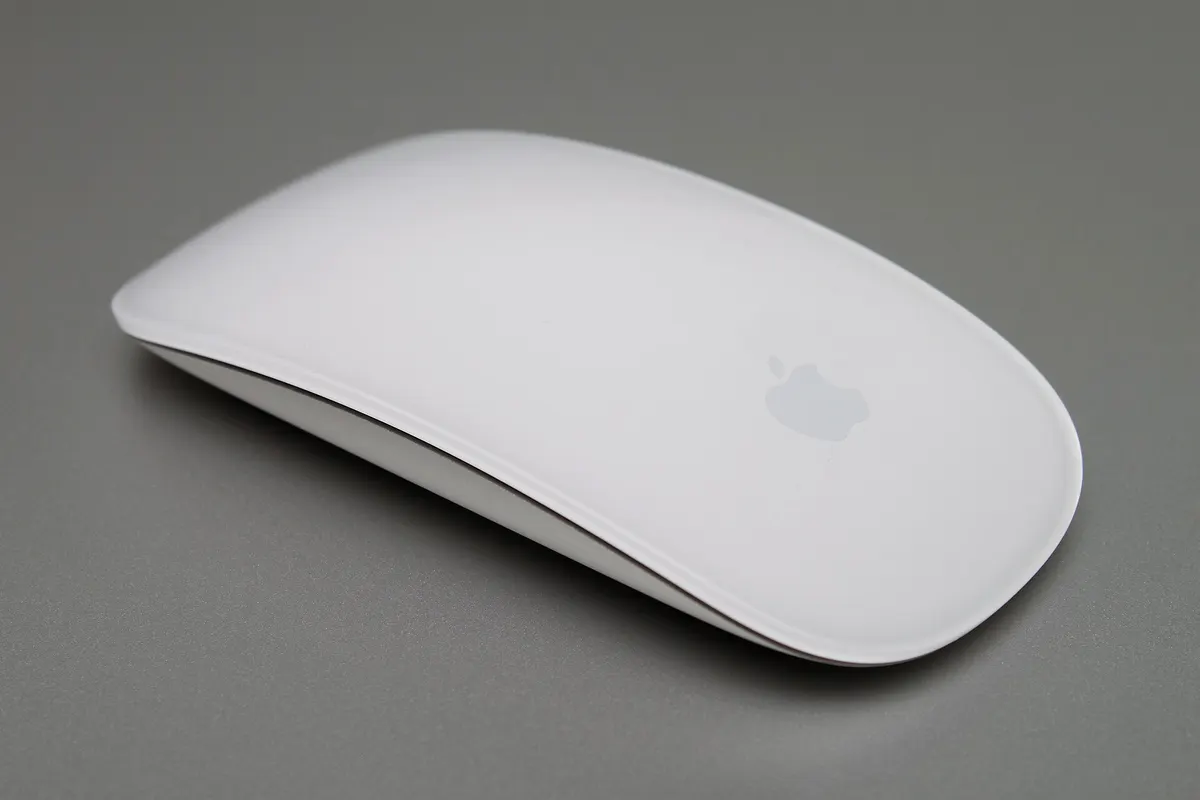
Apple's official computer mouse remains a polarizing accessory for Mac users. While it boasts a sleek minimalist design and touch-sensitive surface, it continues to draw criticism for practical design choices that make long-term use uncomfortable.
Despite updates that swapped the older Lightning port for a USB-C connection, the core complaints from users remain unaddressed. The accessory costs $79 for the white version and $99 for the black version, yet lacks standard features found on competing hardware.
What happened
The Magic Mouse features a shimmery Multi-Touch surface that allows users to scroll sideways and navigate macOS without a traditional scroll wheel. However, its charging port is located directly on the bottom of the device. This layout means the mouse is completely unusable when plugged into a charging cable.
The rechargeable Magic Mouse 2 was originally introduced in October 2015, and the bottom-mounted port survived a nearly decade-long evolution up to the 2024 refresh alongside the M4 iMac. Although the battery typically lasts for a month or more on a single charge—meaning users do not have to flip it over daily—Apple provides no clarity on the expected lifespan of the built-in rechargeable battery.
Beyond charging limitations, the mouse has a slender profile standing just 0.85 inches tall. This low height leaves barely any room for palm support, and its aluminum edges can press uncomfortably against the fingers depending on the user's grip style. Furthermore, the touch-sensitive surface lacks a middle-click function or a programmable thumb button, which poses a significant hurdle for tasks like computer-aided design (CAD) software that require holding a middle mouse button.
While third-party utilities can add some missing features, and users can opt for alternative wireless mice from brands like Logitech, the official Apple accessory continues to polarize consumers due to these hardware limitations.
Why it matters
For professionals and everyday users who spend hours at a computer, ergonomics and functionality directly impact productivity and physical comfort. The lack of palm support and traditional buttons forces users to either alter their natural grip or install extra software to gain basic desktop capabilities.
Additionally, the inability to charge and use the mouse simultaneously represents a major inconvenience for a premium peripheral. Consumers paying high prices for official hardware expect seamless integration, but the Magic Mouse forces a frustrating trade-off between minimalist aesthetics and practical utility.
The background
Apple's Magic Mouse line has long championed touch gestures and a low-profile aesthetic over traditional mechanical components. When the Magic Mouse 2 launched in 2015, the bottom-mounted Lightning port was controversial from day one. Unlike Apple's Magic Keyboard and Magic Trackpad, which permit use while plugged in, the mouse stood apart as an exception.
In late 2024, Apple updated the accessory to include a USB-C port alongside the release of the M4 iMac, but left the physical layout and ergonomic profile unchanged. Committed fans continue to appreciate its multi-touch capabilities and aesthetic matching with macOS, but long-standing grievances regarding its physical design have persisted across generations of the product.
What happens next
Apple has not announced any further updates to resolve the ergonomic complaints or reposition the charging port. It remains unknown how long the internal rechargeable battery is expected to last, and whether future iterations of the mouse will incorporate physical buttons or improved palm support.
Key takeaways
- Apple's Magic Mouse features a bottom-mounted charging port that renders the device completely unusable while plugged into a cable.
- The accessory is priced at $79 for the white model and $99 for the black version, yet lacks a middle-click or programmable thumb button.
- Its slender 0.85-inch profile offers minimal palm support and can cause discomfort against the fingers for users who rest their entire hand on a mouse.
- Users can avoid these limitations by purchasing alternative wireless mice from other brands like Logitech, though they will lose native macOS touch gestures.